Saturday, December 2, 2017

IPv6 with macvtap and libvirt

From the "I wish I'd have known that earlier" files:

I'm posting this here in the hopes of saving some folk the trouble of running this down.

If you are trying to use macvtap onto an existing adapter for a libvirt guest and you're having odd problems with dropped IPv6 traffic, you'll need to add trustGuestRxFilters='yes' to the <interface> stanza in your XML.

An example:

    <interface type='direct' trustGuestRxFilters='yes'>
      <mac address='52:54:00:0d:42:ce'/>
      <source dev='eth0' mode='bridge'/>
      <model type='virtio'/>
      <address type='pci' domain='0x0000' bus='0x02' slot='0x01' function='0x0'/>
    </interface> 

The problem is caused by the macvtap not updating its multicast tables correctly. This is considered correct by design for security reasons. I hope with increased deployment of IPv6 this decision will be revisited.

Some of the reading that led me here:

Saturday, October 29, 2016

Getting DHCPv6 delegation working

...or "How I learned to make friends with duct tape"

Last week I wrote about not being able to route delegated prefixes as none of the servers seemed to have functionality to update the routing table. Shortly after tweeting this, a colleague replied with a way forward. In case Twitter's memory goes a bit hazy, I'll recap here:

Wednesday, October 19, 2016

FAIL: Serving prefixes with DHCPv6-PD

I've been wanting to update the lab for some time so people can bring in their routers to simulate what they'll be seeing at home. This would also allow us to mock things up for ourselves without tearing apart our home networks. For now, this means DHCPv6-PD (Prefix Delegation) as that is what many ISPs are deploying. I finally got some time last weekend to start updating the lab. Sadly, I couldn't get it to work.

To delegate a prefix to downstream, a DHCPv6 server must allocate a free prefix from its pool and then update the router configuration with the new target for that prefix. In our case, the DHCPv6 server and the router are the same machine, so no crazy remote updating is needed. We're running ISC DHCPd at the moment. It turns out, there is no way to update the routing table with this software. Someone has already tried to do this! In our case the IPv6 prefix is static, so there was no need to get a dynamic prefix from upstream. However, the crux of the problem is that while ISC makes hook scripts available for the events, they don't provide the target address to create the route. The linked article was written two years ago. I can find no evidence that anything has changed in that time. If someone out there has gotten this to work with existing software that I haven't found, please let me know.

Thursday, October 13, 2016

All Things Open 2016 - IPv6 enabled sponsors

An interesting exercise for a technical event is to see how many of its sponsors have IPv6 enabled. I have attended All Things Open (who itself enabled IPv6 on their site via CloudFlare) since its inception three years ago and will be doing so again in two weeks, so I decided to perform this exercise. The parameters are simple: Is there an AAAA record on the webserver for the sponsor URL provided? Rather than list the resulting table for all of the sponsors, I will only list those who are enabled.

SponsorHost
RedHatAkamai
CenturyLink BusinessSelf
CoreOSCloudFlare
OpenNMSDigitalOcean
PendoGoogle
MozillaCloudFlare
elasticAmazon (legacy)

Of 46 total sponsors, only 6 have IPv6 enabled on their website, or approximately 13%. It should also be noted that this does not indicate whether these companies have IPv6 support in their product, only that they've cleared the simple hurdle of enabling it for their website.

Particularly interesting here is the one site that is hosted on Amazon. Their site is hosted on a legacy load balancer, which new accounts (VPC) cannot use. I am somewhat hopeful that more Amazon hosted sites will begin to leverage the recently announced IPv6 on CloudFront in the near future.

I plan to continue to meet with folk at these sorts of events and explain the benefits of IPv6 for their projects and the future of the Internet. Hopefully next year's numbers will be much improved.

Monday, March 7, 2016

IPv6 wildcard DNS

The use of the colon as an address separator in IPv6 has caused some mild annoyances over the years. Microsoft created unique solution, essentially mapping colons to dashes and putting this in a top-level domain. They chose ipv6-literal.net and implemented this internal to their software.

In the IPv4 world, the utility of having addresses resolvable as hostnames in DNS had sufficient demand that someone set up xip.io. Unfortunately I've never seen such an equivalent for IPv6 addresses, leaving folk to use the bracket notation and hope for the best.

Sunday, February 21, 2016

Retrospective: IPv6 Utility

When I first started my journey to learn IPv6, I could not get native IPv6 at home from my residential ISP. Undeterred, I went to Hurricane Electric; HE offers both an IPv6 certification program that's a great place to start to learning how IPv6 works, and free IPv6 tunnels. I still recommend their certification as a first step to learn IPv6. (If you can't get native IPv6, you should start by asking your ISP for their timeline to offer access to the entire Internet before getting a tunnel. I would like to think that the excuse "no one is asking for IPv6" is no longer used, but the only way to be sure of that is to ask for it.)

I had my IPv6 tunnel, and I made sure I knew the security stance of anything on my home network with an IPv6 address, but I didn't use it much when I wasn't at home. During this time, I've gotten more confident with my ability to secure my home network as I intend.

At the same time, I've started to use my home network as a testbed for ideas; it's my "proof of concept lab" before I try it at scale at work.

As my ideas have gotten more complicated, I realized I needed a better system for my notes. At work, we use PmWiki, so I decided to use it for my project notes.

I created a new VM for PmWiki, and started to install it. However, I couldn't download PmWiki! Eeek! A quick check showed me that pmwiki.org only had an IPv4 address, and for some reason this VM didn't get a DHCPv4 lease (behind NAT, of course). I really wanted to finish my task, so I used a host that I knew was properly dual-stacked to download, then transferred the tarball from there. I did have to use an intermediate host for its dual-stack visibility into both IPv4 and IPv6 networks, but it didn't take much longer to do that two-step download, and I quickly had PmWiki installed, configured, and running as I wanted.

In fact, it was running so well that I never made time to go back to troubleshoot why this VM host had not gotten an IPv4 address. I could use it when I was at home because I now have native IPv6 (and NAT'd IPv4) at home. I could use it at work because I have dual-stack (native IPv6 and IPv4) there. I was curious to know why it didn't get an IPv4 DHCP lease as expected, but I don't always want to troubleshoot networks when I get home ... that's what I do at work! Several rounds of patches and reboots later, many months later, I noticed that this VM had picked up a DHCP lease, so whatever was broken before wasn't badly broken. My point, though, is not that I was a lazy troubleshooter at home.

My point is that I barely noticed the lack of IPv4 on one of my hosts at home; all I needed to do everything I wanted to do was IPv6. Notably, the reverse would not have been true! Without an IPv6 address on this host at home, I would not have been able to access it while at work without doing a fair amount of port mapping on my home router. With a global IPv6 address, I was able to firewall it to talk only to my home network and to my work network. IPv6 made this easy; I did not miss IPv4 enough to bother figuring out why it didn't work when this VM was created. I would have freaked out without IPv6, and I didn't care about IPv4.

My, how far IPv6 has come! It used to be shiny, and now it's the thing that makes my network easier to use.

Sunday, October 25, 2015

Mission: Possible

You've probably seen our mission statement: "Promoting the adoption of IPv6 for the preservation of an open Internet." Mission statements seem to be a dime a dozen these days, so let's look at just how important this work really is.

At the All Things Open conference last year, one of the speakers talked of "dorm room ready software". It's wonderful that this plethora of software has become available, increasing the speed of prototyping. However, the only reason this is still possible is because those dorm rooms still have global IP addresses. The computer sitting on the desk can still serve content to the world. As we run out of IPv4 addresses, more and more of us will be closed off behind NATs beyond our control. Poor college students can ill afford hosting services that still have those scarce IPv4 addresses. This creates another barrier to innovation unless we do something.

Tuesday, September 1, 2015

Troubleshooting with ping6

At work today, I helped someone use ping6 to figure out what to fix on a server that wasn't reachable over IPv6. I have a pretty basic formula that I thought I would share.

I will use this information for the problem host:

nethope@fixme$ ip -6 address show
1: lo:  mtu 65536 
    inet6 ::1/128 scope host 
       valid_lft forever preferred_lft forever
2: eth0:  mtu 1500 qlen 1000
    inet6 2001:db8:2015:3000::5/64 scope global 
       valid_lft forever preferred_lft forever
    inet6 fe80::201:2ff:fe03:405/64 scope link 
       valid_lft forever preferred_lft forever
nethope@fixme$

When I start troubleshooting, I like to start small and expand to ever-wider scopes. One of my college professors said troubleshooting should start with a simple question to which you know the answer, and take small steps from there.

The smallest scope possible is loopback. Since I usually have multiple network interfaces, ping6 needs to know which one to use. The syntax will vary between operating systems. I used 'ping6 -c3 -I lo ::1' on my Linux, and 'ping6 -c3 ::1%lo0' on my Mac.

ping6 -c3 -I lo ::1

That should work; it should be the question to which you know the answer. If it doesn't work, IPv6 probably isn't configured yet. This command should also work without specifying the interface; if you need to specify the loopback interface then route selection is broken.

Then I expand the scope ever so slightly, all the way up to another easy one, just so I don’t miss some strange condition. Try the link-local address (HINT: it starts with fe80) for that interface. This traffic also shouldn't hit the network, just this computer and its network interface card.

ping6 -c3 -I eth0 fe80::201:2eff:fe03:405

If that fails, first bounce the interface (ifdown; ifup if that's an acceptable outage), and then remove and reconfigure IPv6 for that interface. Again, this task is specific for your operating system. Reconfiguring the interface was the solution today!

The next small step: Try the global address for that interface (still on the same machine). Since it’s a global address, you shouldn’t have to specify the interface, but if you get unexpected results, drop it back in to be sure.

ping6 -c3 -I eth0 2001:db8:2015:3000::5

This should work if the previous two steps worked, but if it doesn't, try the same repair procedure as the previous step.

Now I’m finally ready to move beyond the scope of the NIC, all the way out to the router interface, still within the same VLAN. Again, you shouldn't have to specify which interface to use now, but we're troubleshooting so watch out for oddities. If you know it, start with the router's link-local address.

ping6 -c3 -I eth0 fe80::a8bb:ccff:fedd:eeff
ping6 -c3 -I eth0 2001:db8:2015:3000::1

If that fails, look for a problem within the VLAN. Find other IPv6-enabled hosts in the same VLAN (all of them, right? *grin*), and see if they can reach the default router. If no hosts can reach the router, the router needs to be fixed. (I've had to remove then reconfigure IPv6 on a VLAN on a Cisco router, and magically the very same configuration started working again. It hasn't happened in ages, thankfully.) If most hosts can reach the router, look for reasons why this one has problems. Perhaps it is missing IPv6 router advertisements, and can’t determine its IPv6 default router or thinks it can’t reach it. That would be a problem with ICMPv6 or multicast. Since link-local multicast is generally reliable (multicast querier on the router aside), it's probably the host-based firewall.

Next, if available, look outside your VLAN, but stay on your network. Pick anything.

ping6 -c3 -I eth0 2001:db8:2015:3001::101

If that works, your network is probably fine. If it fails, make sure the router has IPv6 routes. Are all VLANs affected, or just some VLANs? I usually test other VLANs at this step, too.

ping6 -c3 -I eth0 www.yoursite.edu

If you want to be sure that DNS isn't the problem, either don't use hostnames, or validate your hostnames with host or dig first. However, we're entering the territory where I always use hostnames because I don't remember the numbers.

If the problem shows up at this scope, poke around. Pick two hosts in two VLANs, and try traceroute6 in both directions (one to the other and other to the one; I detected an OSPFv3 problem that way). Our F5 load balancers make traceroute look odd, so pay more attention to the simple "good, yes, connected" versus "bad, no, couldn't connect" results at first. Try mtr (a new enough version to support IPv6) and let it run for a while to look for path instability or intermittent packet loss (one weekend when an intermediate router was losing 60% of IPv6 packets).

And then try hosts that aren't on your network, like:
ipv6.google.com
ipv6.he.net
ip6.me

At what step in this process does ping6 fail? There’s the scope of your problem, and where to concentrate your analysis.

Monday, November 17, 2014

IPv6: The first step

I often hear comments like "Where do I start on IPv6?"; I have two answers.

Tuesday, November 11, 2014

What's Wrong with NAT

What's wrong with NAT?

NAT is often proposed as a supposedly-viable alternative to IPv6 deployment. NAT was an attempt to mitigate IPv4 address depletion, to give us time to migrate to IPv6, but not to replace IPv6. As the number of devices connected to the Internet grows, the Internet needs more addresses. IPv6 generally removes the need for any NAT at all, whereas more NAT breaks more applications. Still, what's wrong with NAT?

Wednesday, October 29, 2014

IPv4 crutches

Back in June I participated in Turn off IPv4 Day as a show of solidarity. I had grand plans to write up a long post about the issues encountered throughout the day, but I had already done similar versions of this activity in the lab, so there weren't a whole lot of surprises. There was one gotcha right at the beginning that did catch me a bit off-guard: the Internet looked a lot darker than I anticipated.

Friday, June 6, 2014

2001:db8::867:5309

The other day on IRC, the bot for one of the channels I frequent reconnected, and I noticed it was coming in over IPv4. I knew the host it was on is IPv6 capable, so I jokingly asked it "y u no ipv6?". The bot's owner told me "patches welcome" and pointed me at the bot's source. Now, some of you recall I cringe a bit when someone says that to me, but I decided to poke around.

Wednesday, May 14, 2014

Monitor your IPv6

Many of my recent posts have been about sites that have not yet enabled IPv6. For those of you who have done so: Good on ya! Now, do you monitor it?

I've been encountering an increasing number of web sites with AAAA records, but the addresses listed therein either do not answer (timeout) or refuse the connection (RST). On dual-stack networks, these conditions are often masked by Happy Eyeballs. These situations could also result in inconsistent behavior.

Many mobile devices are being released with IPv6 only. This means in the case of a timeout, the user see an unreachable message (and in the case of a timeout, wait to see it) because there is no IPv4 network on which to fall back to try the A record. These aren't just fringe hobbyist users. This is the booming mobile market driving the continued growth of the Internet.

Make sure you not only monitor your IPv6 the same way you do IPv4, but also act on it the same way. Treat outages on either network as production. Your customers will thank you.

(Joni adds: Be sure you really are monitoring what you think you are. Some tools, when presented with a hostname having both A and AAAA records, will do standard fallback (eg: curl, dig), whereas some tools require the protocol be explicitly called out (eg: ping / ping6).)

Tuesday, March 11, 2014

A call to ISPs

The response from Time Warner Cable every time I call to ask about IPv6 involves some variant on "We are not deploying IPv6 because we have enough IPv4 addresses." This response is wrong on at least three points that I would like to address here.
  • What about the other end? It's all well and good that you have enough IPv4 address space (for now, see next point), but what about the other system I'm trying to communicate with? In other parts of the world ISPs aren't so lucky. The European and Asia-Pacific regions are already out of addresses, and ISPs in those areas are carefully conserving what little IPv4 space they have left.
  • Growing pains. While you may have "a very healthy inventory of IPv4 addresses available" (Michael Tate, TWCBC Account Consultant, East Region, 22 Apr 2013) at present, this will not continue to be the case... unless you don't plan on growing your customer base any further. Deployments of IPv6 alongside IPv4 should already be underway, if not complete, to ensure there has been adequate testing not only on the part of the ISP but at all the customer sites. Deploying IPv6 "only ... in instances where IPv4 addresses are completely out" (@TWC_Help, Twitter DM, 10 Mar 2014) puts everyone at a disadvantage.
  • The whole Internet. I touched on this in a previous post with regard to content providers, but the same call should go out to the ISPs. Why do I want to subscribe to an ISP that isn't giving me access to all of the Internet?
I've had the good fortune of bumping into Wes George on the Google+ IPv6 discussion group back in October 2013. He was very interested to hear about my experiences and has been nothing but incredibly helpful as we've exchanged emails these past few months. Despite his efforts, we clearly still have a long way to go.

I pick on TWC here because they are my ISP and I've had the most direct experience with them. My impression is that other ISPs are behaving in a similar fashion. I hope we can all get moving before this migration gets any costlier.

Thursday, February 6, 2014

Photo gallery now live

I am pleased to announce the IPv6 photo gallery is now live on our site. If you have received an IPv6 sticker at one of our presentations, or have some other interesting use of IPv6, please send us a picture! We'd love to feature it in the gallery.

Saturday, November 30, 2013

CookieNet

In recent months, there have been presentations at some of the big Internet gatherings by Time Warner Cable engineers about IPv6-only access networks. The first was by Wes George at IEPG/IETF in October 2013 (slides). The second was by Lee Howard at RIPE 67 (video, slides). Seeing these presentations reminded me of my own foray into this realm a couple years ago.

Sunday, October 13, 2013

ARIN 32: A call to content providers

This week I remotely participated in ARIN 32. This was the second ARIN meeting I have participated in.

On the second day of the meeting, John Curran gave a presentation on Government Affairs and Public Policy (slides). In this presentation he spoke about a meeting of Internet coordinating bodies he attended in Uruguay earlier this month. In this meeting, those assembled "called for the transition to IPv6 to remain a top priority globally. In particular Internet content providers must serve content with both IPv4 and IPv6 services, in order to be fully reachable on the global Internet."

This statement grabbed my attention. During the open microphone following his presentation, I posed the following question: "What can we do to encourage the content providers to step up their adoption?" This was his response:
"It's actually not that hard. If someone says they have something on the Internet and it's not v6 reachable, call them on it. It's only on a subset of the Internet. If you have a website and it's not v6 reachable, it's not on the Internet. It's only on a part of the Internet. If everyone in this room says that to everyone they meet, that will make a difference."
For years many have been debating the chicken-and-egg scenario of which end needs IPv6 first: content or access? Of course the right answer is both, but many are reticent to be first movers. We have now reached a point where the content providers must step up to prevent a new NAT nightmare. Access providers are running out of IPv4 space. They are going to start needing to upgrade their equipment in order to continue to provide services to their users. If the primary source of the content those users are accessing is still IPv4 only, they will likely opt for Carrier Grade NAT (CGN) in lieu of upgrading directly to capable equipment. This is not a viable solution. NAT was originally created to give the Internet community time to perform the migration to IPv6. That time is about up.

If you are trying to enable your site to deliver content over IPv6 and having problems, let us know.

Thursday, August 8, 2013

Learn (or Review) IPv6 Troubleshooting!

If you missed my first LinuxFest talk on IPv6 Troubleshooting, you have a second chance! I will be speaking on Saturday at Ohio LinuxFest 2013 too. I think the LinuxFests want me to get out of the office to meet the community, and I'm really looking forward to it!

Friday, July 26, 2013

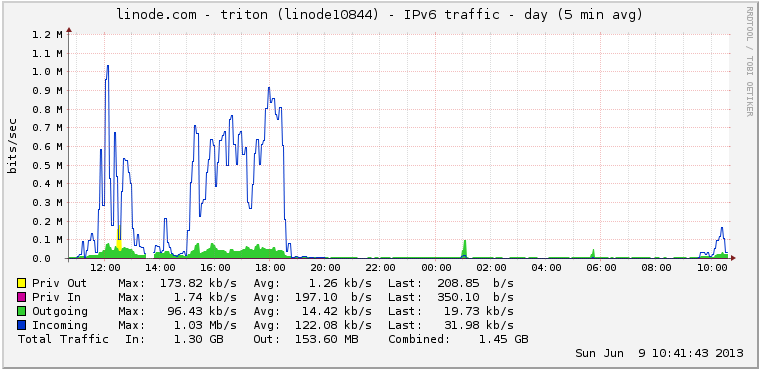
Graph from SELF 2013

Who doesn't like pretty graphs?

I didn't think to go back and grab the graph until Sunday morning, but this gives you a sense of how much traffic we passed through the lab in the afternoon on Saturday.


The wireless coverage in parts of the main exhibit hall was a bit spotty, so our access point was filling in some gaps.